Flexilay
HomeBuyer's guide

Best WooCommerce layby software for 2026

A practical, fairly-named guide to the WooCommerce layby, deposit and part-payment options worth shortlisting for your store.

Sign Up
Best WooCommerce layby software for 2026

Layby (or layaway) lets a customer reserve goods and pay them off over time, with the merchant holding the item until the final payment lands. Good WooCommerce layby or deposit software should make that schedule automatic: take an initial payment, set up weekly, fortnightly or monthly instalments, send reminders, and clearly track who has paid what — without exposing you to lending, credit checks or chargeback-heavy BNPL economics.

The right tool also keeps you in control. You should decide which products are eligible, keep ownership of the goods until a plan completes, and collect money straight into your own payment account rather than a third party that holds the funds. Below we rank the options, starting with Flexilay, then cover what to look for and how to add layby to your WooCommerce store.

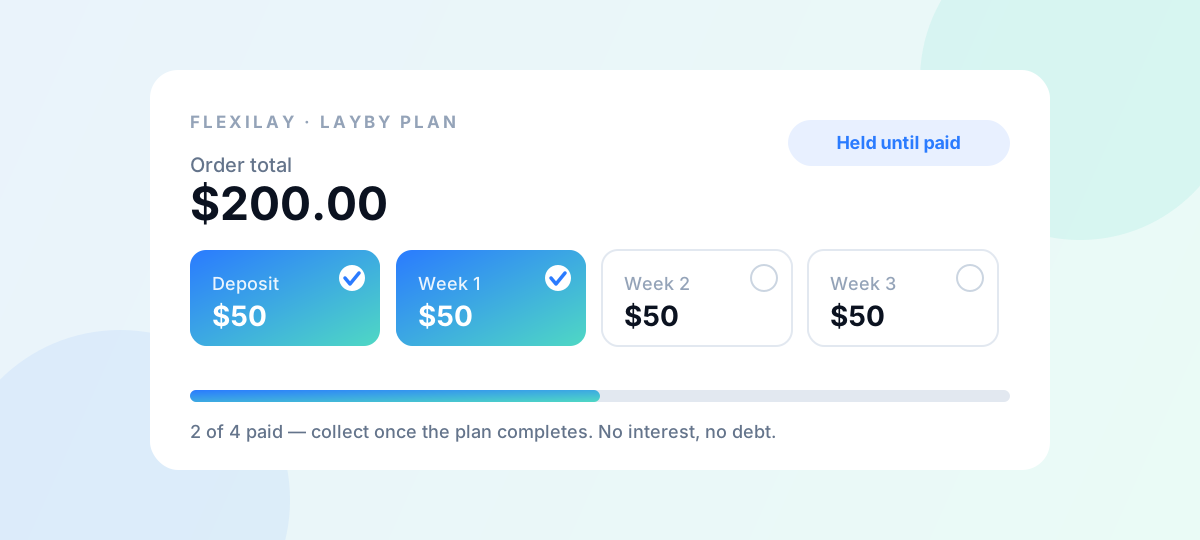
Flexilay LayBy payment plan — a deposit plus scheduled instalments, collected once paid off.
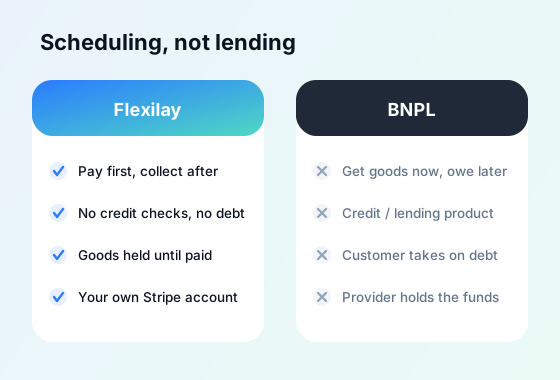
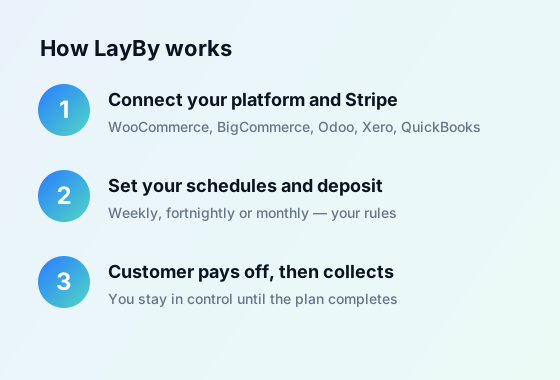
Side-by-side merchant dashboard showing a layby plan's progress (deposit paid, instalments remaining) versus a BNPL payout.Three-step graphic: connect WooCommerce + Stripe, set plan rules, customer pays off over time while goods are held.

WooCommerce layby and deposit options compared

Flexilay is purpose-built modern layby. The others are deposit/part-payment plugins or a buy-now-pay-later gateway — useful, but solving slightly different problems. Verify current features and pricing on each vendor's site before you buy.

Flexilay

Our pick

Modern LayBy / payment scheduling built for merchants, and live for WooCommerce today. Customers pay a deposit then pay the balance off weekly, fortnightly or monthly — no credit checks, no interest, no debt and no lending risk. You keep control of the goods until the plan completes, and payments flow through your own Stripe account, so Flexilay never holds your funds. Free to start with no monthly or setup fees and a small per-completed-order fee (see pricing). Built in Australia. Also live for BigCommerce, Odoo, Xero and QuickBooks, with Shopify coming soon.

WooCommerce Deposits (by Woo)

The official deposits extension from Woo (Automattic). Lets customers pay a deposit or follow a payment plan with custom percentages and intervals, and supports layaway-style arrangements. It is gateway-independent and does not collect follow-up payments automatically, so customers return to pay each instalment manually. A solid first-party option if you already buy from the Woo marketplace.

YITH WooCommerce Deposits and Down Payments

A widely used premium deposits and down-payments plugin from YITH. You can enable deposits store-wide or per product/category, make them optional or mandatory, and — when paired with YITH's Stripe plugin — automatically charge the balance to the same card. Includes balance reminders and integrates with YITH Booking for taking deposits on bookings.

Deposits & Partial Payments for WooCommerce (by Acowebs)

A free plugin on WordPress.org (with a paid upgrade) for taking fixed-amount or percentage deposits, then collecting the balance later. The free tier covers store-wide and per-product deposit settings and gateway controls at checkout; the premium version adds payment plans, email reminders and automatic Stripe balance payments. A budget-friendly way to trial deposits.

Afterpay Gateway for WooCommerce

Afterpay's official buy-now-pay-later checkout gateway. The customer is approved by Afterpay, receives the goods immediately, and repays Afterpay in instalments while you are paid upfront (less Afterpay's fees). This is BNPL/lending, not true layby — different economics and customer terms — but worth knowing if instant delivery matters more than holding the goods.

What to look for in WooCommerce layby software

Automatic scheduling

Deposit plus recurring instalments (weekly, fortnightly, monthly) collected without the customer having to remember to come back.

You keep control of goods

True layby holds the item until the plan completes — pick software that supports this rather than shipping immediately.

Money into your own account

Prefer tools that route payments through your own Stripe (or similar) account so no third party holds your funds.

No lending or credit risk

Layby is the customer paying you over time — not a loan. Avoid taking on credit checks, interest or compliance you do not need.

Clear tracking and reminders

A dashboard of who has paid what, plus automated reminders, cuts admin and reduces abandoned plans.

Honest pricing

Watch for monthly fees, setup costs and percentage cuts. A small per-completed-order fee keeps incentives aligned.

Why Flexilay: real layby, not BNPL, with no lending risk

Most WooCommerce add-ons in this space are deposit plugins (take a deposit, chase the balance) or BNPL gateways (a lender pays you, then collects from the customer). Flexilay is different: it is purpose-built modern LayBy, where the customer simply pays you off over time on a schedule you control.

There are no credit checks, no interest and no debt for the customer, and no lending risk or financial-services compliance for you. You keep the goods until the plan is paid in full, and every payment runs through your own Stripe account — Flexilay never holds your money. Because it is already live for WooCommerce, you can offer it on your store now.

Adding layby to your WooCommerce store

Flexilay connects to WooCommerce through its WooCommerce connector and uses your own Stripe account to collect the deposit and scheduled instalments. You choose which products are eligible and the payment cadence, the customer agrees to the plan at checkout, and Flexilay automates the rest — collection, tracking and reminders — until the plan completes and the goods are released.

Connect WooCommerce

Link your store and your own Stripe account; no funds are ever held by Flexilay.

Set your plan rules

Choose eligible products, deposit size and a weekly, fortnightly or monthly schedule.

Go live

Customers select LayBy at checkout and Flexilay handles collection and reminders automatically.

Layby vs buy now, pay later (BNPL)

They look similar but work very differently. With layby, the customer pays you directly over time and you hold the goods until the final payment — no lender, no interest, no credit check. With BNPL, a third party approves the customer, pays you upfront minus fees, and takes on the repayment relationship (and the lending economics) themselves.

For merchants who want to avoid chargeback exposure, keep margins, and serve customers who would rather not take on debt, layby is often the better fit. BNPL can still make sense when instant delivery is essential.

Frequently asked questions

What is the best WooCommerce layby software?
For true layby — where the customer pays you off over time and you hold the goods until completion — Flexilay is purpose-built and live for WooCommerce. Deposit plugins like WooCommerce Deposits, YITH Deposits & Down Payments, and Acowebs' Deposits & Partial Payments handle deposits and part-payments, while Afterpay's gateway covers BNPL. The best choice depends on whether you want real layby, simple deposits, or instant-delivery BNPL.
Is Flexilay available for WooCommerce now?
Yes. Flexilay is live for WooCommerce today via its WooCommerce connector, so you can start offering modern LayBy on your store without waiting.
Does layby mean taking on lending or credit risk?
No. With Flexilay, the customer is simply paying you over time — there is no loan, no interest and no credit check, so you do not take on lending risk or financial-services compliance. You keep control of the goods until the plan is paid in full.
How are layby payments collected on WooCommerce?
With Flexilay, the deposit and scheduled instalments are collected through your own Stripe account. Flexilay automates the schedule and reminders but never holds your funds — money flows directly to you.
How is layby different from buy now, pay later?
In layby the customer pays you directly over time and you hold the goods until the final payment, with no lender or interest involved. In BNPL a third-party lender pays you upfront and collects repayments from the customer, taking on the lending relationship and fees.
What does Flexilay cost?
Flexilay is free to start with no monthly or setup fees, and charges only a small fee per completed order. See the pricing page for current details.

Add modern LayBy to your WooCommerce store

Flexilay is live for WooCommerce — no monthly fees, no lending risk, and payments straight into your own Stripe account.

Sign Up
Sources
  • WooCommerce Deposits is the official Woo extension for deposits, payment plans and layaway, is gateway-independent and does not collect follow-up payments automatically. WooCommerce.com — WooCommerce Deposits
  • YITH WooCommerce Deposits and Down Payments allows store-wide or per product/category deposits, optional or mandatory deposits, balance reminders, and automatic balance charging when paired with YITH's Stripe plugin. YITHemes — YITH WooCommerce Deposits and Down Payments
  • Deposits & Partial Payments for WooCommerce by Acowebs is a free WordPress.org plugin for fixed or percentage deposits, with a premium upgrade adding payment plans, reminders and automatic Stripe balance payments. WordPress.org — Deposits & Partial Payments for WooCommerce
  • Afterpay Gateway for WooCommerce is Afterpay's official buy-now-pay-later checkout gateway; the customer is redirected to Afterpay to confirm payment and the merchant is paid while Afterpay collects instalments. WordPress.org — Afterpay Gateway for WooCommerce
Back to home